Whilst repairing an Amiga 1200, I noticed that the right and middle mouse buttons were unresponsive on both ports of this machine. It worked with an original Amiga mouse, but not with my YAMI mouse adapter. However, the mouse adapter couldn’t be the cause, as it has worked reliably for decades on all sorts of Amigas, including another Amiga 1200.
The problem is already known to the community and seems to affect other mouse interfaces as well. The solutions I could find so far were:
- Just use the original Amiga mouse. 😉 Despite all the love for old hardware: the era of ball mice is over.
- Modify the mouse adapter. For some, there is even a “fixed” version.
- Use a “FixRMB” tool. However, the tool has to be started first, so it doesn’t work in games or in the boot menu. It also requires a mouse adapter with internal pull-up resistors. YAMI doesn’t have these, for example.
- Swap the Paula. The soldering work requires experience and suitable equipment. Furthermore, it’s a shame about the otherwise fully functional Paula.
None of these options really appeal to me. I want this Amiga to work like all the others. So I went looking for the cause.
The middle and right mouse buttons are connected to the Paula’s POT pins. These inputs are actually intended for analogue joysticks and use a very simple ADC. The analogue joystick charges a capacitor whilst a counter in the Paula measures the time. The charging process takes varying amounts of time depending on the joystick’s position. Once a certain voltage level is reached, the counter is stopped. The counter value reflects the capacitor’s charging time and therefore the joystick’s position.
For mouse buttons, there is a digital mode. Here, a built-in pull-up resistor pulls the POT line to High. As soon as a mouse button is pressed, the line is pulled to Low. The result can be read directly from the Paula registers.
With an original mouse, there was 0.9 V on the POT line on this Amiga when the button was pressed. With the mouse adapter, it was a mere 1.1 V. This seems like only a minor difference, but on this Paula chip, it was already enough for “button pressed” and “button released”.
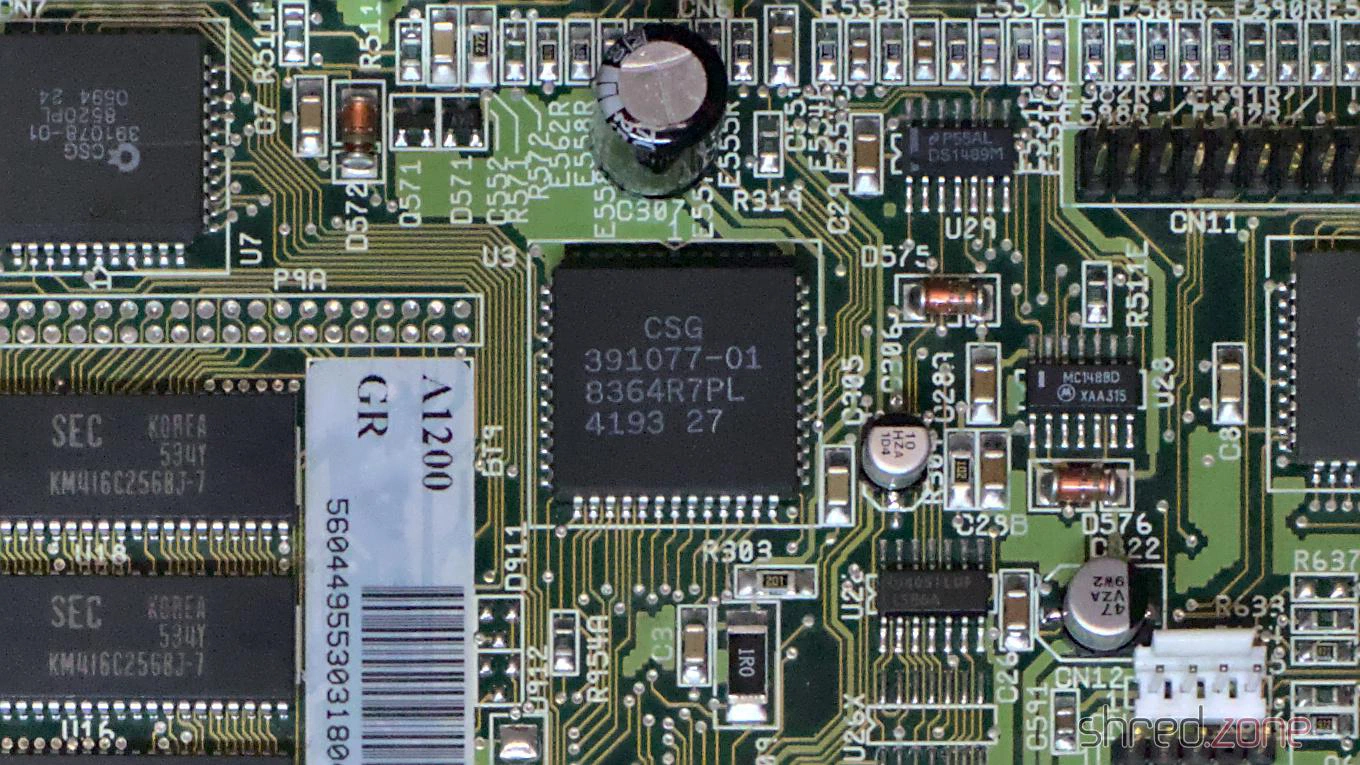
Now comes the exciting question: Why does the problem only seem to occur on Amiga 1200 models, even though the affected Paula batch was probably also used in Amiga 4000 production?
If you compare the schematics of both machines, there is a small but important difference. This is a simplified diagram of the joystick or mouse port for both models:
The essential difference lies in the components circled in red. In the Amiga 4000, Commodore installed EMI filters there. Basically, they are nothing more than a bare wire in a ferrite. They filter out high frequencies, but act like a 0 Ω resistor at low frequencies (like a mouse button).
In the Amiga 1200 and Amiga 600, Commodore installed 68 Ω resistors here, presumably to lower the production costs for the low-end models. (Interestingly, Commodore returned to ferrites on the CD³².)
What effect does this resistor have? Together with the pull-up resistor built into the Paula, it forms a voltage divider. The switch in a classic Amiga mouse pulls this divider to ground, resulting in 0.9 V at the POT input. This is just enough to be recognised as Low.
A mouse adapter, however, doesn’t have real switches, but logic outputs. The PIC16F84 used in the YAMI interface, for example, has a Low level of about 0.6 V. The voltage divider then delivers 1.1 V at the POT input, which is interpreted as High by this Paula batch. The mouse button is no longer recognised as being pressed.
I don’t know if the pull-up resistor has too low a value in this Paula batch or if the threshold for Low levels is lower. Both would be possible.
To fix the problem on my Amiga 1200, I replaced the 68 Ω resistors E353R, E354R, E363R and E364R with SMD 1206 ferrites, as used in the Amiga 4000. They are slightly larger than the 0804 resistors, but can still be soldered directly onto the pads.
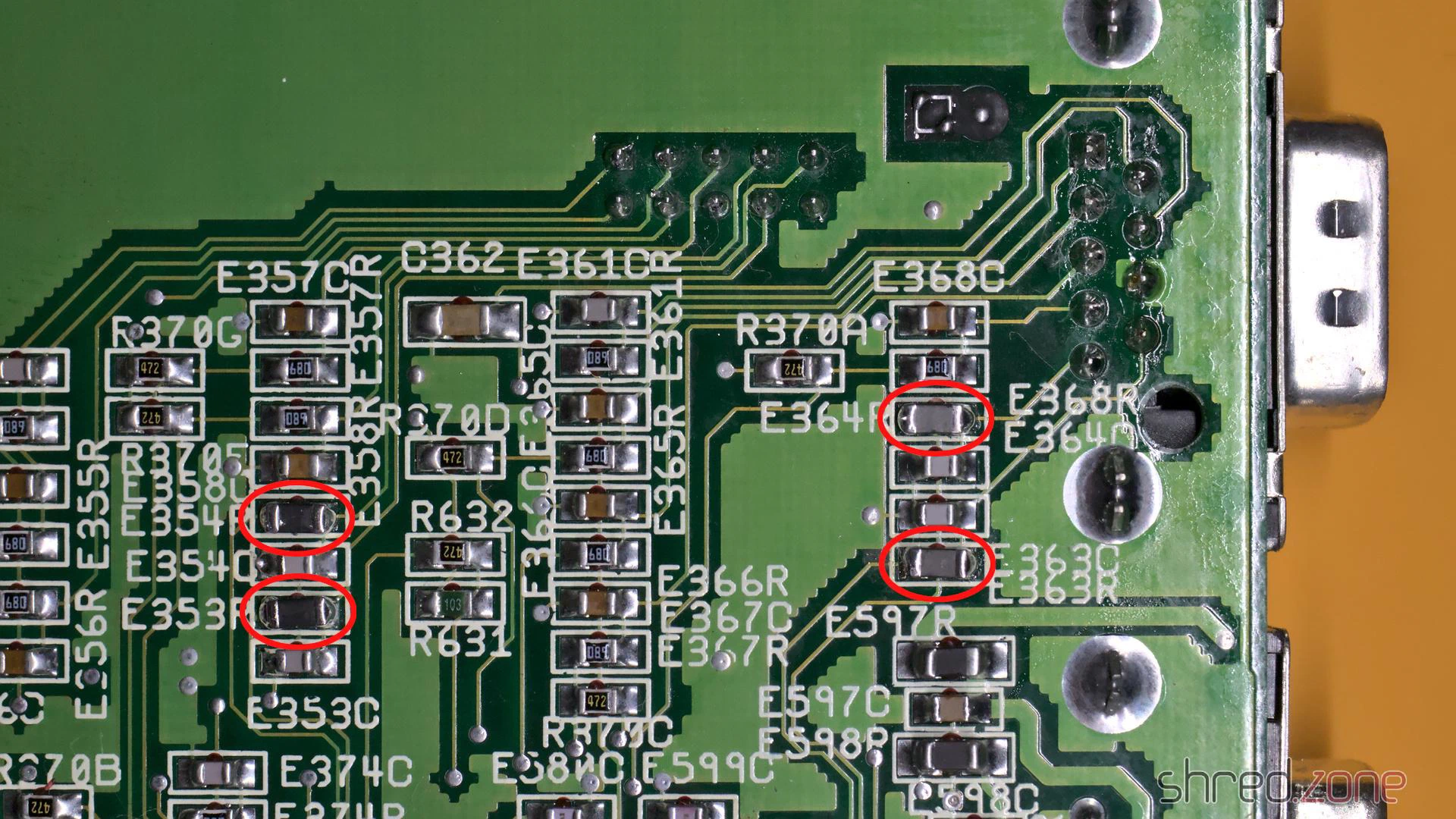
You also need to replace E353R, E354R, E363R and E364R when working on the Amiga 600.
This is just a minor hardware modification that can be carried out even with little soldering experience. Certainly more so than swapping a PLCC chip.
Following the change, the mouse adapter also worked reliably on this Amiga.
Make sure to replace the resistors with ferrites, not the capacitors next to them! The resistors are typically printed with the number 680. (Nothing would break if you accidentally swapped the capacitors, but the right and middle buttons would then be permanently pressed.)
PS: If you found this article because your Amiga has this problem too, please send me the date code of your Paula chip. Perhaps we can find a pattern of “bad” date codes. Thanks!